A large share of the teams building on Codename One are banks and financial institutions. They don’t ask me for a prettier list component. They ask how to pass a penetration test, what the auditor will want to see, and which protections actually work on which device.
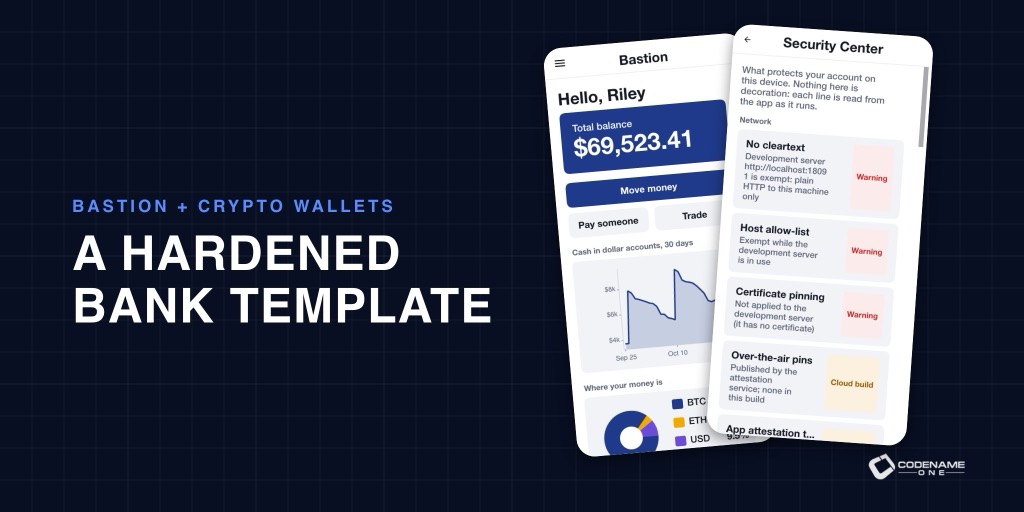
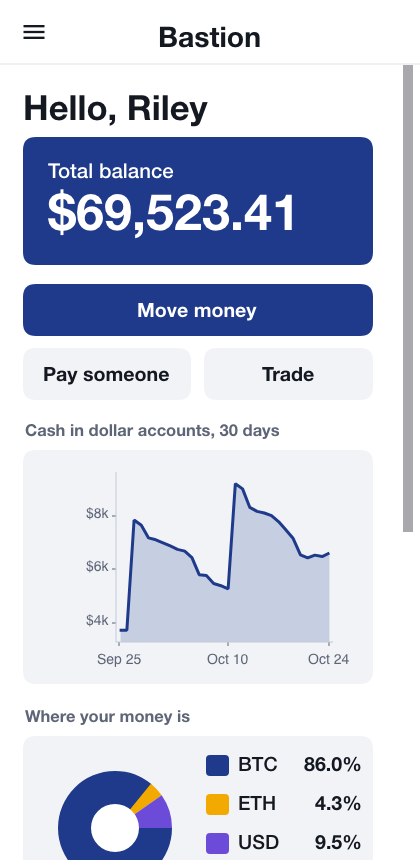
Bastion is my answer, written as code. It’s a virtual bank and a small exchange, the app and its server in one Java project. Customers hold dollars, euros, bitcoin and ether, move money, issue and freeze cards, trade, and withdraw coins to addresses they’ve allowed in advance. Staff verify the ledger and the audit trail. It’s a template you can brand, but mostly it’s a reference: every hardening technique in it is there so you can read how it’s done.
Defense in layers
No single protection makes an app secure. Bastion stacks them, so an attacker who gets past one meets the next.
Signing in. OAuth authorization code with PKCE, five minute access tokens and rotating twelve hour refresh tokens. A TOTP second factor with ten recovery codes, plus WebAuthn passkeys. Once an account has a passkey, Bastion requires the strongest factor it has. Lockouts and per address rate limits slow down guessing, and changing the password ends every other session.
The device. On first sign in, the app generates a P-256 key pair, registers the public key with the server, and seals the private key with AES-256-GCM under a key kept in the Keychain or Keystore. The app locks after 30 seconds in the background or two minutes idle, and unlocks with biometrics, then a PIN, then a full sign in.
Every request that moves money is signed. Not just authenticated with a token. Signed with the device key, over a canonical form that includes a timestamp and a single use nonce:
String text = SignedRequest.canonical(method, target, Hash.sha256(body),
        idempotencyKey, nonce, ts);
byte[] der = Signature.sign(Signature.SHA256_WITH_ECDSA, privateKey, utf8(text));
return SignedRequest.header(deviceId, ts, nonce, Base64.encodeUrlSafe(jose(der)));
A stolen access token can’t move money without the device key. A captured request can’t be replayed, because the nonce is spent.
The network. The app refuses cleartext, talks only to an allow list of hosts, and pins their certificates. That’s AppShield, a Codename One API, configured in a few lines:
ShieldConfig shield = new ShieldConfig().collectSignals(true);
for (String host : AppConfig.ALLOWED_HOSTS) {
    shield.protect(host, HostPolicy.ENFORCED);
}
AppShield.init(shield);
The screen. Secure windows that keep sensitive screens out of screenshots and the app switcher, tapjacking protection, and a clipboard that clears itself after you copy an account number.
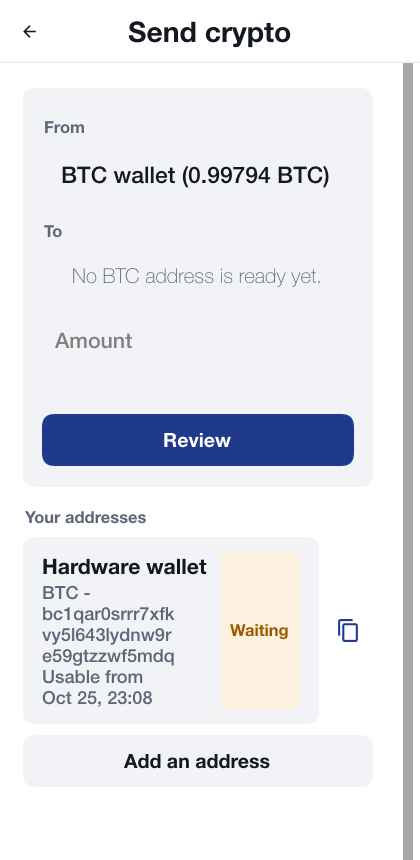
Limits. Per transfer and daily limits, a cooling-off period for new payees, step up authentication above a threshold, and an allow list for crypto withdrawals.
The Security Center tells the truth
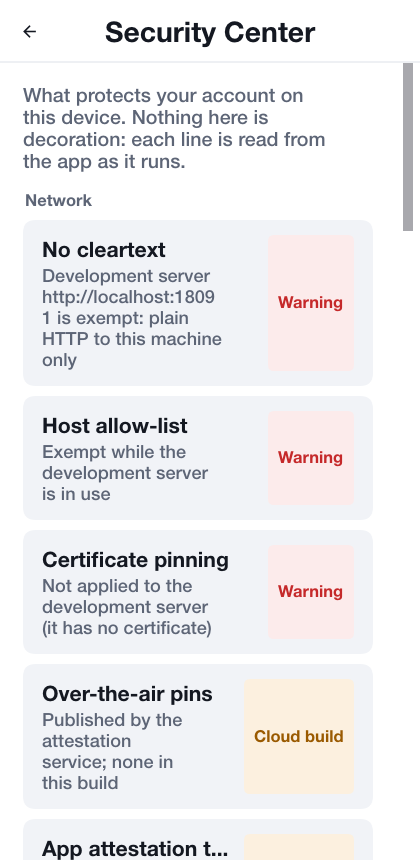
Most security settings screens show a column of green checks. Bastion’s Security Center shows what’s actually on for this device and this build. Some protections need a cloud build: code obfuscation with string encryption and control flow flattening (cn1.hardenLevel=aggressive), Play Integrity, jailbreak detection, and blocking screenshots when the app goes to the background. When those aren’t active, the Security Center labels them “Cloud build” rather than showing a green check. A test keeps that screen in sync with the build hints, so it can’t drift into a lie.
The back office auditors want
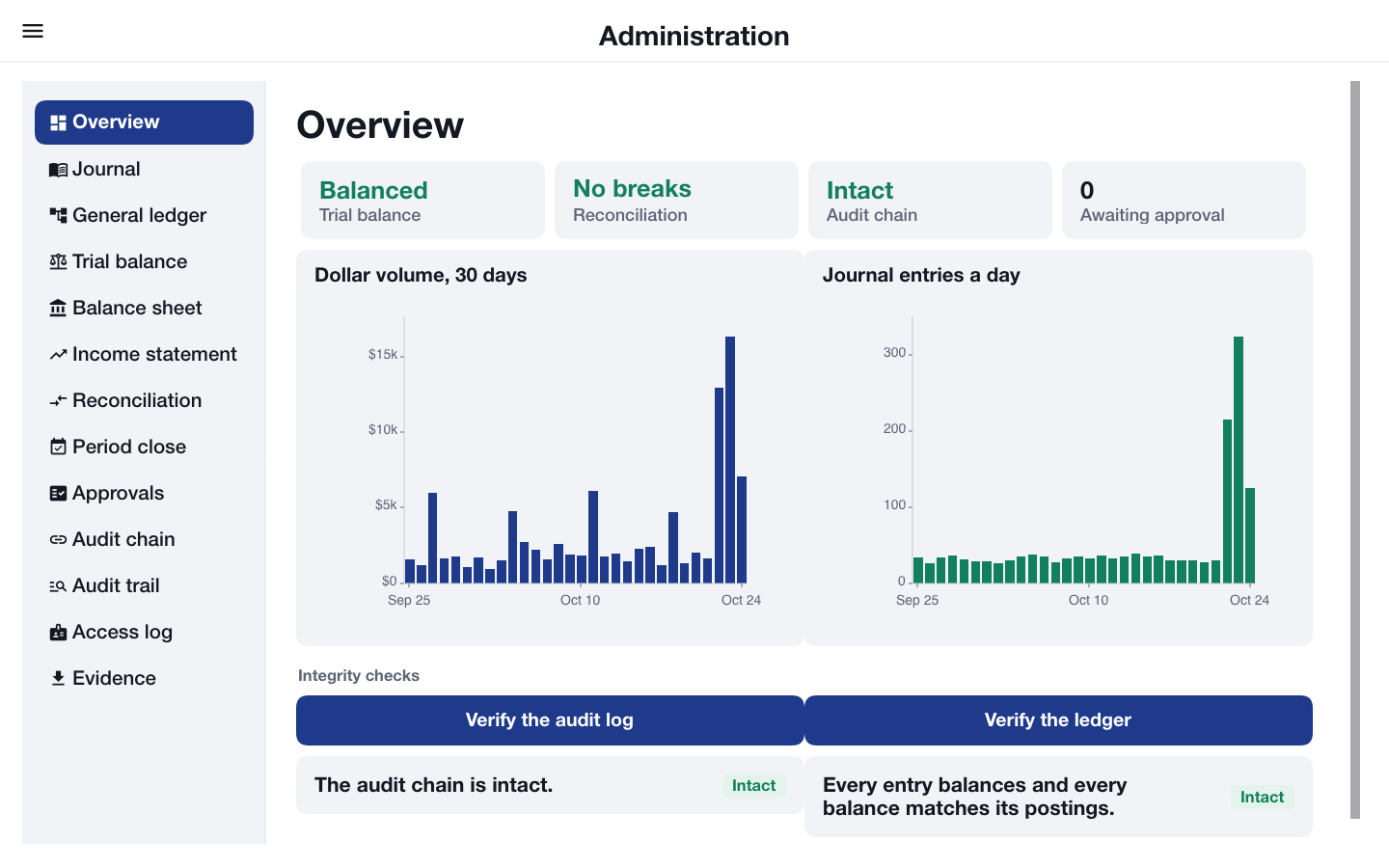
Money is a double entry ledger, not a balance column. The admin console has the journal, T-accounts, a trial balance, a balance sheet, an income statement, reconciliation, period close and a maker checker approvals queue. Every event lands in a hash chained audit log, and the console can verify the chain and export evidence as CSV. A read only auditor role sees all of it, on a desktop or on a phone.
Crypto wallets, exchanges and custody, in core
I’m not a fan of crypto currency. I know plenty of people who are, and a few of them are customers. We’re here to serve, and if we serve, we should be the best at it. So this isn’t a wallet library bolted on the side. It’s a big feature: everything a wallet, an exchange or a custodian needs, in core, with no third party library, and the same classes run in the app and in a Codename One backend.
| Package | What’s in it |
|---|---|
crypto.hd | BIP-39 recovery phrases, BIP-32 and SLIP-10 derivation, DerivationPath |
crypto.evm | EIP-55 addresses; legacy, EIP-2930 and EIP-1559 transactions; EIP-191 and EIP-712 signing; the Solidity ABI and ERC-20 |
crypto.bitcoin | P2PKH, P2SH, P2WPKH, P2WSH and Taproot addresses, scripts, transactions, PSBT and WIF |
crypto.solana | Transactions, the system and SPL token programs, priority fees |
crypto.wallet | Wallet, Signer, SeedSigner and VaultSigner |
crypto.rpc | EVM JSON-RPC, Esplora for Bitcoin, Solana JSON-RPC |
crypto.market | Price feeds: CoinGecko, any JSON price API, and a caching decorator |
A wallet
One recovery phrase gives you addresses on every chain, and they match MetaMask, Electrum, Sparrow and Phantom on the standard paths, so a user can restore the same phrase in another wallet and find the same money:
String words = Mnemonic.generate(256);           // 24 words
Wallet wallet = Wallet.fromMnemonic(words, "");
EvmAddress eth = wallet.getEvmAddress(0, 0);                 // m/44'/60'/0'/0/0
BitcoinAddress btc = wallet.getBitcoinAddress(BitcoinNetwork.MAINNET,
        Wallet.BIP84, 0, 0, 0);                              // bc1q...
SolanaAddress sol = wallet.getSolanaAddress(0);              // m/44'/501'/0'/0'
Bitcoin covers legacy, nested SegWit, native SegWit and Taproot, on the main network and on every test network. Sending ether is an EIP-1559 transaction with the fees the node suggests:
EvmRpc rpc = new EvmRpc(new NetworkTransport(), "https://ethereum-sepolia-rpc.publicnode.com");
DerivationPath path = Wallet.evmPath(0, 0);
EvmAddress from = wallet.getEvmAddress(path);
long nonce = rpc.getTransactionCount(from, "pending");
UInt256[] fees = rpc.suggestFees();                     // {tip, fee cap}
long gas = rpc.estimateGas(from, to, value, null);

EvmTransaction tx = EvmTransaction.eip1559(rpc.chainId(), nonce, fees[0], fees[1],
        gas, to, value, null);
String hash = rpc.sendRawTransaction(wallet.signEvmTransaction(tx, path));
Bitcoin goes through a PSBT, so the same code works with a hardware signer that only sees the partially signed transaction. Taproot inputs are signed with BIP-340 Schnorr automatically:
EsploraClient.Utxo coin = esplora.getUtxos(from).get(0);
BitcoinTransaction tx = new BitcoinTransaction();
tx.addInput(coin.getTxid(), coin.getVout());
tx.addOutput(coin.getValue() - feeSats, BitcoinAddress.parse(recipient, net));

Psbt psbt = Psbt.fromTransaction(tx);
psbt.setWitnessUtxo(0, coin.toOutput());
psbt.signAll(wallet.getBitcoinKey(path));
psbt.finalizeAll();
String txid = esplora.broadcast(psbt.extract());
Keys are handled the way a security review expects. VaultSigner keeps the phrase sealed behind biometrics or a password and refuses to sign while it’s locked. revealMnemonic returns a char[] you can wipe, not a String that lingers on the heap, and SeedSigner.destroy() wipes the key.
An exchange
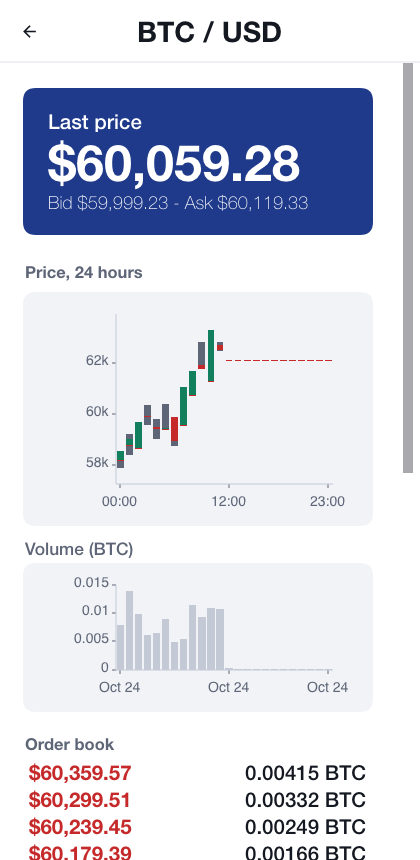
An exchange is mostly the server side, and that’s what Bastion’s backend shows. It derives a deposit address per customer (m/44'/60'/0'/0/n), scans new blocks, credits deposits once they’re deep enough, and sweeps them to a hot wallet on a separate account. It stops scanning and writes an audit event on a reorganization deeper than its confirmation depth. Before every withdrawal it checks that reserves cover what customers hold, and withdrawals go only to addresses the customer allowed in advance. Order prices are collared against the index price, so a fat finger can’t sell bitcoin for a dollar.
Every one of those steps lands in the double entry ledger and the hash chained audit log from the previous section, which is what lets the auditor trace a coin from deposit to withdrawal.
Performance
The expensive parts (secp256k1, Schnorr, Ed25519, the hashes and PBKDF2) run as native C on iOS, macOS, Android, Windows and Linux, with a portable Java engine as the fallback. CI benchmarks every kernel against libsecp256k1, OpenSSL and BouncyCastle on the same machine, and a pull request that makes one slower fails.
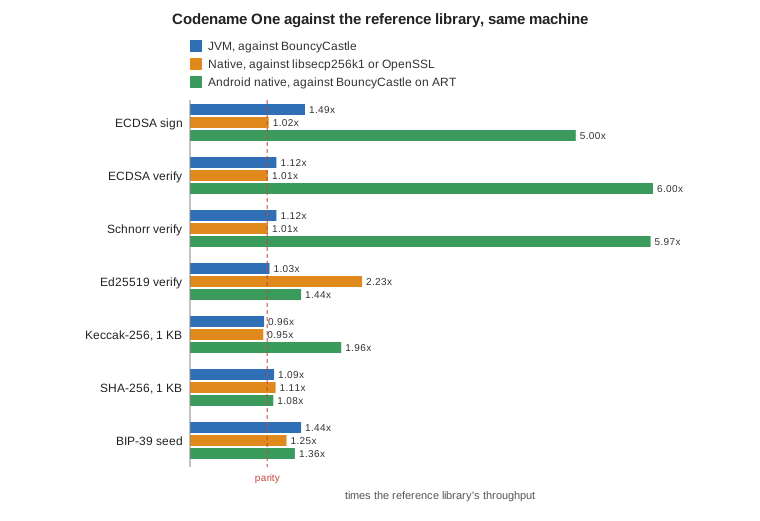
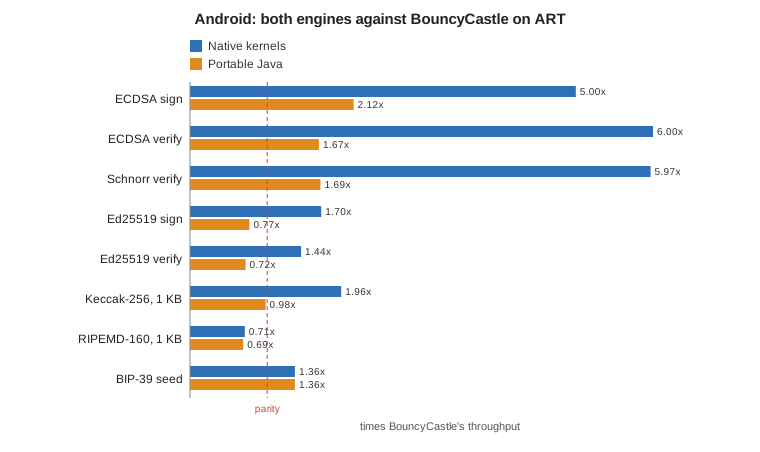
Natively, ECDSA signing matches libsecp256k1 (60,770 against 59,453 signatures a second), and Ed25519 signs 2.44 times as fast as OpenSSL. Even the portable Java engine, which the simulator uses, beats BouncyCastle on the JVM: 1.76 times on public key derivation, 1.49 on ECDSA signing, and 20 times the JDK’s own Ed25519 provider. On Android the native engine verifies ECDSA signatures six times as fast as BouncyCastle on ART:
A phone signs one transaction at a time. An exchange or an indexer checks thousands of signatures at once, so CryptoBatch takes a whole batch:
boolean[] valid = CryptoBatch.verifySecp256k1(hashes, signatures, publicKeys);
It spreads the batch across every core, and for large batches the GPU too: Metal on Apple, Vulkan elsewhere and WebGPU in the browser, split by measured speed. The GPU never sees a private key. On every core, a batch of 1,024 verifies ECDSA 7.46 times as fast as libsecp256k1 called once per signature, and Ed25519 15.6 times as fast. In the browser, WebGPU verifies ECDSA 8.5 times as fast as the portable engine.
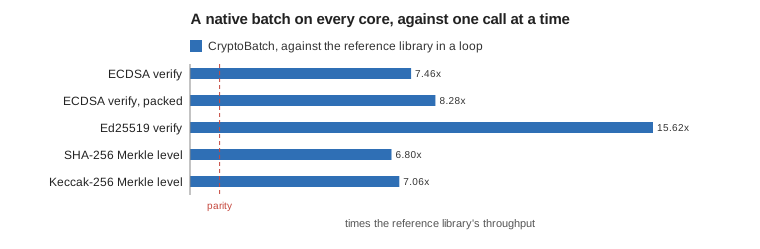
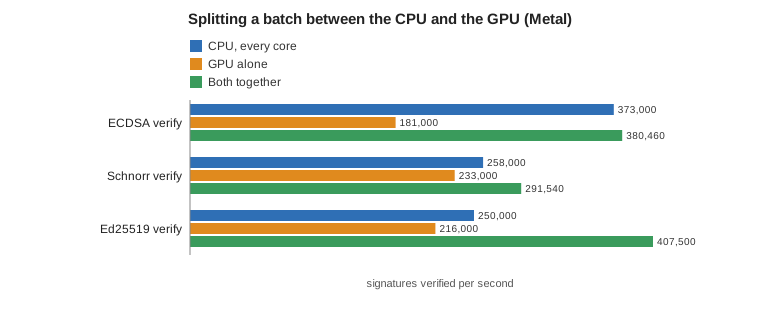
The GPU’s gain on a machine with 12 fast cores is modest, up to 1.63 times for Ed25519, and the chapter says so. Where it pays is a smaller CPU and the browser. Every table and chart is in the crypto wallets chapter, with the machine, the library versions and how to rerun them.
What’s simulated
Bastion is a reference, not a licensed bank. Deposits, card spending and the market (a random walk) are simulated, and Android integrity checks trust every device in the dev profile. There’s no KYC or sanctions screening, no payment rail, no HSM and no regulatory reporting. The implementor’s guide has a section for each of those that says what a production deployment needs. On the crypto side, ether can settle on a real Ethereum node, while bitcoin stays a ledger balance in the sample. Only the three chain families above are supported, and the node clients are blocking calls, so keep them off the UI thread.
Try it
Generate Bastion from the Initializr, or run it from the repository:
CN1_PROFILE=dev backend/server.sh run
mvn verify -Psimulator -DskipTests -Dcodename1.platform=javase
Sign in as customer@bastion.example with the password bastion-demo-password, then open the Security Center and see what your build actually protects.
Tomorrow: Reel: Your Own Streaming Service or Course Platform.